How to Make a Jatayu AI Video and Photo, Step by Step
Updated November 17, 2026
Quick Answer
Upload one standing photo, choose Jatayu Rise or Jatayu Flyover, and download an 8-second 9:16 MP4 plus the still photo it was made from. A 480p video is 236 credits ($2.36) and a 720p video is 516 ($5.16). Sign in and buy credits first, as there is no free trial.
What You Need
- One clear photo of yourself, standing, from the knees up or full length, with an even light and your face facing the camera.
- An account with credits: 236 for a 480p video or 516 for 720p, bought in one-time packs that start at $5.
- A few minutes of patience. The task keeps running in the background if you close the page.
Step 1 — Pick the Right Photo
Stand facing the camera, knees up or full length, in soft even light. A plain background helps the composite settle onto the ridge, and a sharp file keeps your face steady across all eight seconds.
Skip hats, hoods and sunglasses, and skip group photos: the scene takes one adult person only. A photo of a minor, a celebrity or a public figure cannot be used.
Step 2 — Choose Jatayu Rise or Jatayu Flyover
Both modes composite your photo onto the same sunset ridge first, then animate it. Choose by the shot you want:
| Mode | What happens | Best photo | Credits |
|---|---|---|---|
| Jatayu Rise | The eagle climbs from behind the ridge until its head is above yours, then opens its wings | Standing, knees up or full length | 236 at 480p, 516 at 720p |
| Jatayu Flyover | The eagle glides in from the distance and passes low over your head, its shadow crossing you | Standing, with sky visible above you | 236 at 480p, 516 at 720p |
Step 3 — Generate in the Studio
Open the studio, upload the photo, choose the mode and start the render. The photo step runs first, then the 8-second animation.
The task runs in the background, so you can close the tab and come back. If a step fails, the credits go back automatically.
Step 4 — Download Your Video and Photo
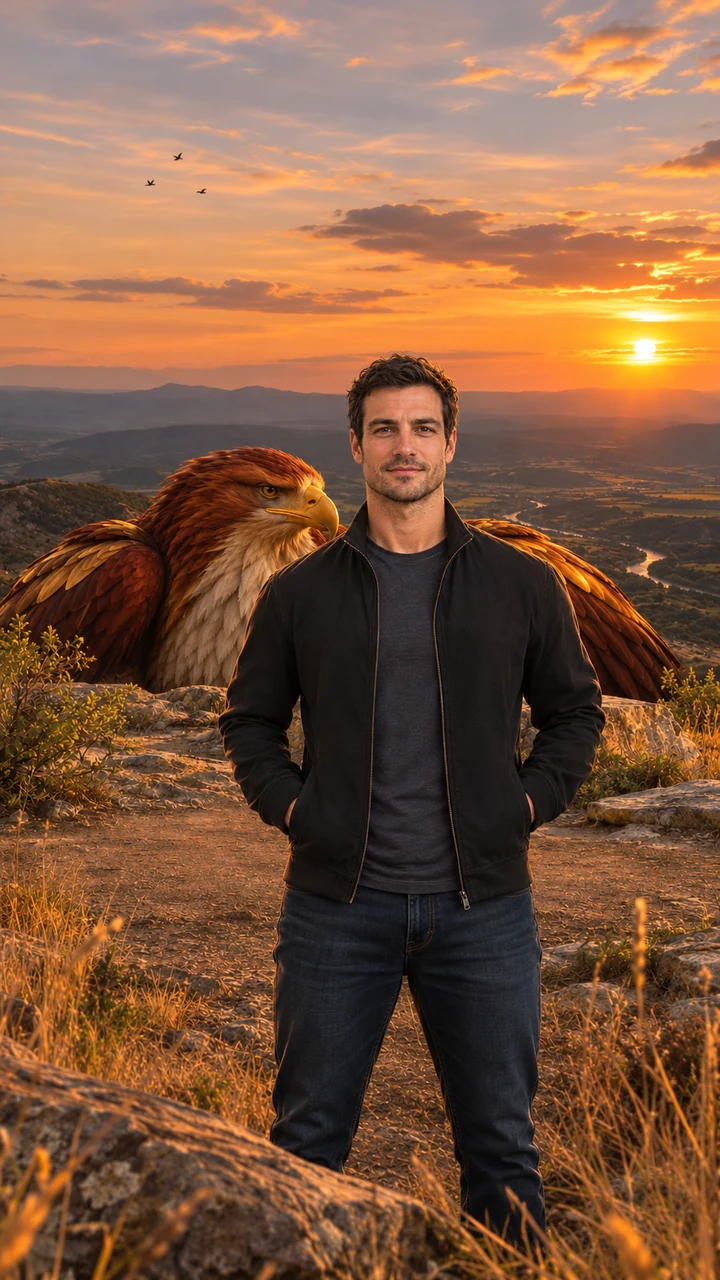
Two files come out of each run: the 9:16 MP4 at 480p or 720p with no watermark, and the composited still the video starts from.
The clip already carries its own score and sound effects: wind, wing beats, a distant eagle cry, slow strings and low drums. There is nothing to add before you post.
Step 5 — Post It Respectfully
- Mark the video as AI-generated when the app asks.
- Only upload photos of yourself or of adults who agreed.
- Do not use the scene to mock a religious figure or a belief.
Free Jatayu AI Prompts for Video and Photo
These are shortened versions of the prompts this site runs for you. You do not need to paste anything here: they are for anyone who wants the same shot in another image or video model that accepts a reference photo. They read best in English.
Jatayu AI photo prompt
Photorealistic vertical 9:16 portrait of one adult person standing on a golden-hour rocky ridge above a wide valley, facing the camera, framed from the knees up, calm and confident, warm sunset backlight, dry grass and low bushes, a colossal original mythic eagle with deep red-brown and burnished gold feathers, a pale cream chest, a hooked golden beak and calm amber eyes crouched just behind the ridge with only its head and folded wings visible; a natural bird with no crown, jewelry, armor or human features. Exactly one person, no other people, no text, no logos, no watermark.
Jatayu Rise video prompt
Animate the image as the first frame. One continuous 8-second vertical 9:16 shot with no cuts. Keep the person's face, hair, outfit and the background exactly as in the first frame in every frame; the person stays facing the camera. The eagle keeps the same look, colors and feathers throughout. 0–2s: the person stands still facing the camera, wind moving their hair and clothes, small birds drifting across the sunset. 2–5s: behind the person the giant eagle slowly rises above the ridge until its head is high above the person's head. 5–8s: the eagle opens its vast wings wide, filling the sky behind the person, feathers rippling in the wind, a flock of small birds swirling around it; the camera pushes in slowly while the person stays calm and looks into the lens. Majestic, steady and respectful mood. Natural wing physics, real wind, five fingers on each hand, natural human proportions. No extra people, no crown, jewelry or armor on the eagle, no captions, logos or watermarks. Photorealistic cinematic look, warm golden backlight, no morphing, no drifting of the face or background over time.
Jatayu Flyover video prompt
Animate the image as the first frame. One continuous 8-second vertical 9:16 shot with no cuts. Keep the person's face, hair, outfit and the background exactly as in the first frame in every frame; the person stays facing the camera. The eagle keeps the same look, colors and feathers throughout. 0–2s: the person stands still facing the camera while the eagle is a distant shape in the sunset sky. 2–5s: the eagle glides toward the camera, growing huge, wings fully spread. 5–7s: it sweeps low just over the person's head, its shadow passing over them, the wind blowing their hair and clothes. 7–8s: the eagle climbs away into the sky behind the person with a flock of small birds trailing; the person glances up, then looks back into the lens. Majestic, steady and respectful mood. Natural wing physics, real wind, five fingers on each hand, natural human proportions. No extra people, no crown, jewelry or armor on the eagle, no captions, logos or watermarks. Photorealistic cinematic look, warm golden backlight, no morphing, no drifting of the face or background over time.
Image models start from the photo prompt. Video models take your photo plus one of the animation prompts as the first frame. Results differ by model, and the versions used here are tuned for this site.
Making the Jatayu Edit in Google Flow Instead
Google Flow can reach a similar shot: you bring a reference video of the eagle move, your own photo and a prompt that swaps the person in the clip. It needs a Google account, and the free quota depends on the account.
The output follows the reference closely, so the clip you pick decides most of the result, and expect a few retries before the eagle and your face both hold up. It is a fair route if you already have a reference you like.
Photo Do's and Don'ts
Do
- A standing photo from the knees up, evenly lit, with your face toward the camera.
- Your upper body in frame, with room above your head for the eagle.
- A calm, neutral expression. The scene is quiet, not a pose.
Don't
- Hats, hoods, sunglasses or a face turned away.
- Group photos, pets or children. One adult only.
- Heavy filters, backlight that hides your face, or a blurry file.
Troubleshooting
My face looks different in the video
Start from a sharper, front-facing photo where your face fills more of the frame. Faces that are small or turned at an angle drift more between frames.
The eagle looks too small
Jatayu Rise needs space behind you for the bird to climb into. A photo with your whole body visible and less empty foreground gives it more room.
The generation is taking a while
Each run makes two passes, a still and then a video, so a few minutes is normal. You can close the page; the task keeps going and lands in your history.
The video looks soft
480p is the cheaper option and shows it on a large screen. Re-run at 720p for a sharper file.
Keep Reading
Jatayu AI Video FAQ
Upload one standing photo, choose Jatayu Rise or Jatayu Flyover, and generate. A few minutes later you download an 8-second 9:16 MP4 and the still photo it was built from.