ジャターユAI動画と画像の作り方、手順つき
2026年11月17日更新
短い答え
立った写真を1枚アップロードし、Jatayu RiseかJatayu Flyoverを選ぶと、8秒の9:16 MP4と元になった静止画をダウンロードできます。480pは236クレジット($2.36)、720pは516クレジット($5.16)。無料トライアルはないので、先にログインしてクレジットを購入してください。
用意するもの
- 自分の鮮明な写真1枚。立ち姿で膝上から全身、光が均一で、顔がカメラを向いているもの。
- クレジットのあるアカウント。480pなら236、720pなら516で、$5からの単発パックで購入します。
- 数分の余裕。ページを閉じてもタスクはバックグラウンドで続きます。
ステップ1 — 適切な写真を選ぶ
カメラの方を向いて立ち、膝上から全身で、やわらかく均一な光の中で撮ります。背景がシンプルだと合成が尾根になじみ、鮮明なファイルなら8秒間ずっと顔が安定します。
帽子、フード、サングラスは避け、集合写真も避けてください。このシーンは大人1人だけを想定しています。未成年、有名人、公人の写真は使えません。
ステップ2 — Jatayu RiseかJatayu Flyoverを選ぶ
どちらもまず同じ夕日の尾根に写真を合成し、それから動かします。欲しいショットで選んでください。
| モード | 何が起きるか | 向いている写真 | クレジット |
|---|---|---|---|
| Jatayu Rise | 鷲が尾根の後ろから上がり、頭があなたより高くなってから翼を広げます | 立ち姿、膝上から全身 | 480pで236、720pで516 |
| Jatayu Flyover | 鷲が遠くから滑空してきて、頭のすぐ上を低く通過し、その影があなたを横切ります | 立ち姿で、頭の上に空が見える | 480pで236、720pで516 |
ステップ3 — スタジオで生成する
スタジオを開き、写真をアップロードし、モードを選んでレンダリングを開始します。先に写真の工程、その後に8秒のアニメーションが走ります。
タスクはバックグラウンドで動くので、タブを閉じて戻ってこられます。工程が失敗した場合、クレジットは自動で戻ります。
ステップ4 — 動画と写真をダウンロード
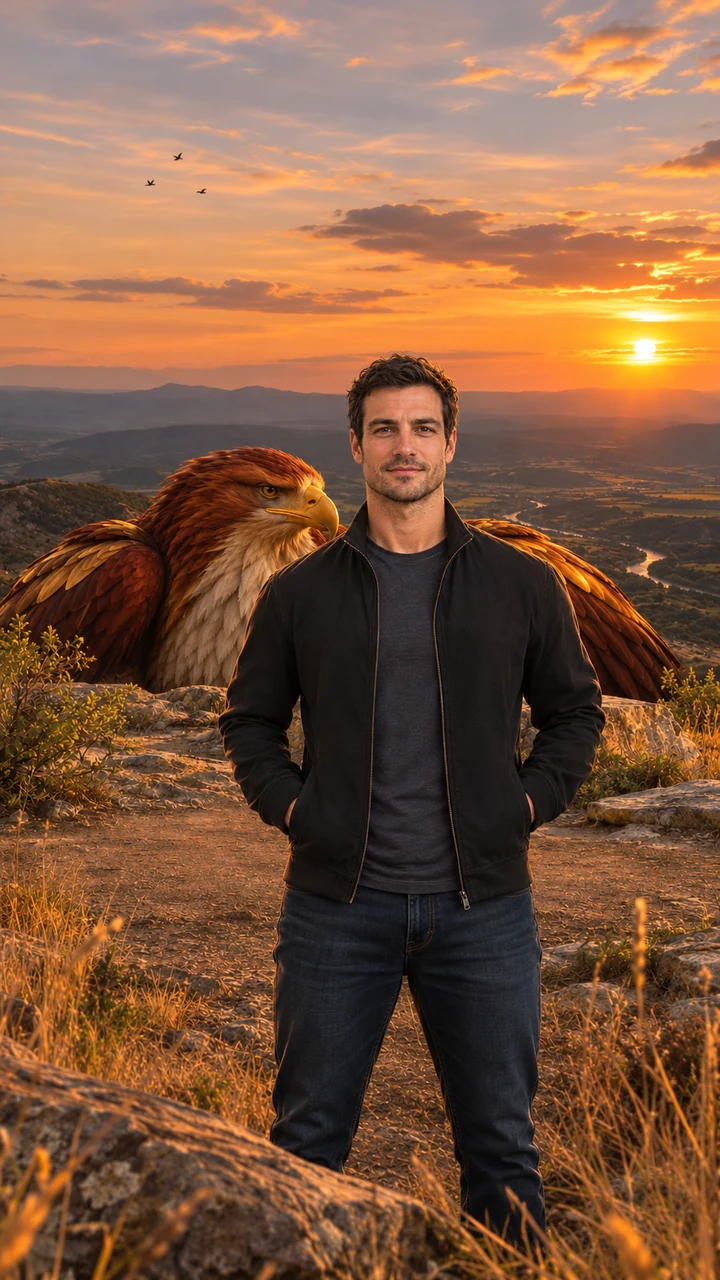
1回の実行で2つのファイルが出ます。透かしのない480pまたは720pの9:16 MP4と、動画の起点になる合成済みの静止画です。
クリップには音楽と効果音がすでに入っています。風、羽ばたき、遠くの鷲の声、ゆっくりした弦と低いドラム。投稿前に足すものはありません。
ステップ5 — 敬意をもって投稿する
- アプリが求めたら、AI生成動画であることを示します。
- 自分自身、または同意した大人の写真だけをアップロードします。
- 宗教的な人物や信仰を嘲るためにこのシーンを使わないでください。
ジャターユAIの無料プロンプト(動画・画像)
ここにあるのは、このサイトが代わりに実行しているプロンプトの短縮版です。ここに貼り付ける必要はありません。参照写真を受け付ける別の画像・動画モデルで同じショットを作りたい人向けのものです。英語で読むのがいちばん正確です。
ジャターユAI画像プロンプト
Photorealistic vertical 9:16 portrait of one adult person standing on a golden-hour rocky ridge above a wide valley, facing the camera, framed from the knees up, calm and confident, warm sunset backlight, dry grass and low bushes, a colossal original mythic eagle with deep red-brown and burnished gold feathers, a pale cream chest, a hooked golden beak and calm amber eyes crouched just behind the ridge with only its head and folded wings visible; a natural bird with no crown, jewelry, armor or human features. Exactly one person, no other people, no text, no logos, no watermark.
Jatayu Rise 動画プロンプト
Animate the image as the first frame. One continuous 8-second vertical 9:16 shot with no cuts. Keep the person's face, hair, outfit and the background exactly as in the first frame in every frame; the person stays facing the camera. The eagle keeps the same look, colors and feathers throughout. 0–2s: the person stands still facing the camera, wind moving their hair and clothes, small birds drifting across the sunset. 2–5s: behind the person the giant eagle slowly rises above the ridge until its head is high above the person's head. 5–8s: the eagle opens its vast wings wide, filling the sky behind the person, feathers rippling in the wind, a flock of small birds swirling around it; the camera pushes in slowly while the person stays calm and looks into the lens. Majestic, steady and respectful mood. Natural wing physics, real wind, five fingers on each hand, natural human proportions. No extra people, no crown, jewelry or armor on the eagle, no captions, logos or watermarks. Photorealistic cinematic look, warm golden backlight, no morphing, no drifting of the face or background over time.
Jatayu Flyover 動画プロンプト
Animate the image as the first frame. One continuous 8-second vertical 9:16 shot with no cuts. Keep the person's face, hair, outfit and the background exactly as in the first frame in every frame; the person stays facing the camera. The eagle keeps the same look, colors and feathers throughout. 0–2s: the person stands still facing the camera while the eagle is a distant shape in the sunset sky. 2–5s: the eagle glides toward the camera, growing huge, wings fully spread. 5–7s: it sweeps low just over the person's head, its shadow passing over them, the wind blowing their hair and clothes. 7–8s: the eagle climbs away into the sky behind the person with a flock of small birds trailing; the person glances up, then looks back into the lens. Majestic, steady and respectful mood. Natural wing physics, real wind, five fingers on each hand, natural human proportions. No extra people, no crown, jewelry or armor on the eagle, no captions, logos or watermarks. Photorealistic cinematic look, warm golden backlight, no morphing, no drifting of the face or background over time.
画像モデルは画像プロンプトから始めます。動画モデルは写真とアニメーションプロンプトのどちらかを最初のフレームとして使います。結果はモデルによって異なり、ここで使っている版はこのサイト向けに調整されています。
Google Flowでジャターユ編集を作る場合
Google Flowでも近いショットは可能です。鷲の動きの参照動画、自分の写真、クリップ内の人物を差し替えるプロンプトを用意します。Googleアカウントが必要で、無料枠はアカウントによって異なります。
出力は参照に忠実なので、選ぶクリップが結果の大半を決めます。鷲とあなたの顔が両方もつまで何度かやり直す前提で。気に入った参照がすでにあるなら、妥当な選択肢です。
写真のOKとNG
OK
- 膝上からの立ち姿、光が均一、顔がカメラを向いている。
- 上半身が入り、頭の上に鷲のための余白がある。
- 穏やかで自然な表情。静かなシーンで、ポーズではありません。
NG
- 帽子、フード、サングラス、顔をそらした写真。
- 集合写真、ペット、子ども。大人1人だけです。
- 強いフィルター、顔が隠れる逆光、ぼやけたファイル。
うまくいかないとき
動画の顔が違って見える
より鮮明で正面を向いた、顔が画面に大きく写る写真から始めてください。顔が小さい、または斜めを向いていると、フレーム間でずれやすくなります。
鷲が小さすぎる
Jatayu Riseは鳥が上がるぶん、あなたの後ろに空間が必要です。全身が写り、手前の余白が少ない写真のほうが余裕が生まれます。
生成に時間がかかる
1回の実行で静止画と動画の2工程を通るので、数分かかるのは正常です。ページは閉じてかまいません。タスクは続き、履歴に残ります。
動画が甘く見える
480pは安い選択肢で、大きな画面ではそれが分かります。720pで再実行すると、より鮮明なファイルになります。
続けて読む
ジャターユAI動画FAQ
立った写真を1枚アップロードし、Jatayu RiseかJatayu Flyoverを選んで生成します。数分後に8秒の9:16 MP4と、元になった静止画をダウンロードできます。