如何一步步做出贾塔尤 AI 视频与图片
更新于 2026 年 11 月 17 日
快速回答
上传一张站立的照片,选择 Jatayu Rise 或 Jatayu Flyover,几分钟后下载 8 秒 9:16 的 MP4 以及生成它的静态图。480p 视频 236 积分($2.36),720p 视频 516 积分($5.16)。请先登录并购买积分,因为没有免费试用。
你需要准备
- 一张自己的清晰照片,站立、从膝盖以上或全身,光线均匀,脸部正对镜头。
- 一个有积分的账号:480p 视频 236 积分,720p 516 积分,以一次性积分包购买,起步 $5。
- 几分钟的耐心。关闭页面后任务仍会在后台继续运行。
第 1 步 —— 选对照片
面向镜头站立,取膝盖以上或全身,在柔和均匀的光线下。干净的背景有助于合成更好地落在山脊上,清晰的文件能让你的脸在这 8 秒里保持稳定。
不要帽子、兜帽和墨镜,也不要合照:这个场景只容纳一位成年人。未成年人、名人或公众人物的照片不能使用。
第 2 步 —— 选择 Jatayu Rise 或 Jatayu Flyover
两种模式都会先把你的照片合成到同一处日落山脊上,再让它动起来。按你想要的镜头来选:
| 模式 | 画面发生什么 | 最合适的照片 | 积分 |
|---|---|---|---|
| Jatayu Rise | 鹰从山脊后方升起,直到头部高过你的头顶,然后张开双翼 | 站立,膝盖以上或全身 | 480p 为 236,720p 为 516 |
| Jatayu Flyover | 鹰从远处滑翔而来,从你头顶低空掠过,影子扫过你身上 | 站立,头顶上方能看到天空 | 480p 为 236,720p 为 516 |
第 3 步 —— 在工作台生成
打开工作台,上传照片,选择模式并开始渲染。先生成图片,再做 8 秒的动画。
任务在后台运行,你可以关掉标签页再回来。如果有步骤失败,积分会自动退回。
第 4 步 —— 下载你的视频和图片
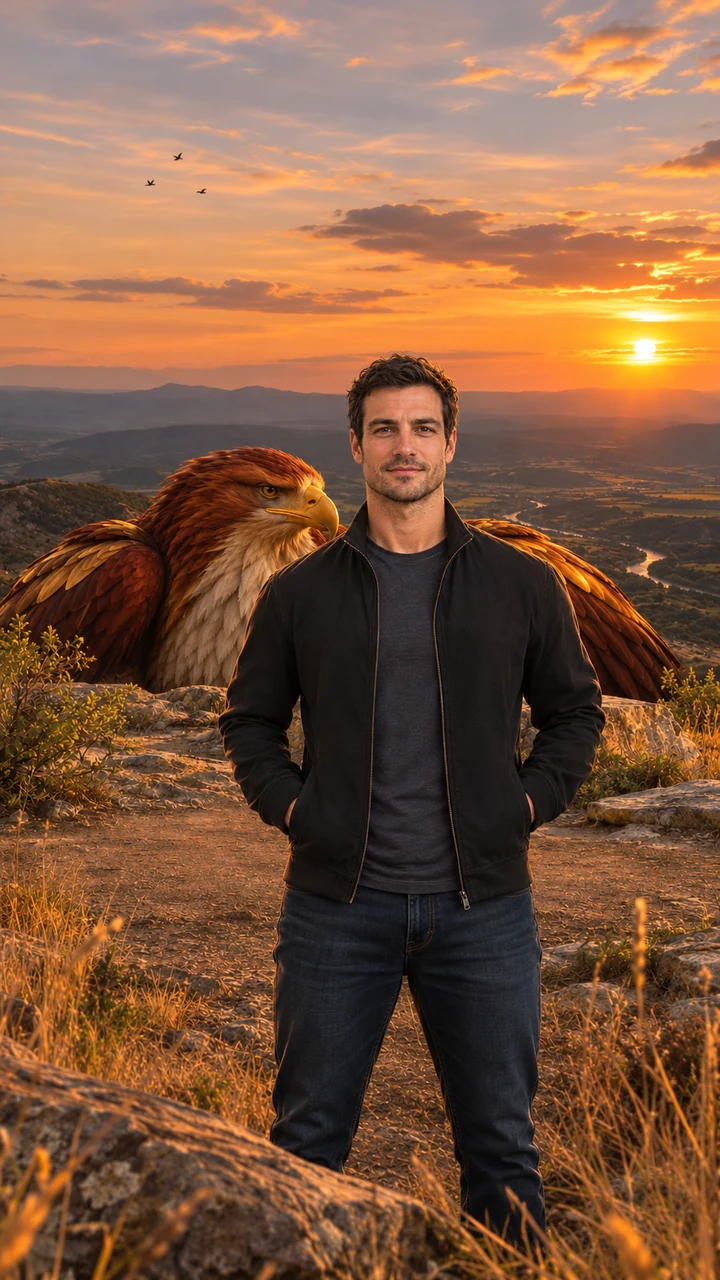
每次运行会产出两个文件:480p 或 720p 的 9:16 MP4(无水印),以及视频起始用的那张合成静态图。
片段自带配乐和音效:风声、振翅声、远处的鹰唳、缓慢的弦乐与低沉的鼓点。发布前不需要再添加任何东西。
第 5 步 —— 得体地发布
- 应用要求时,把视频标记为 AI 生成。
- 只上传你自己的照片,或已获得同意的成年人的照片。
- 不要用这个场景去嘲弄宗教人物或信仰。
免费的贾塔尤 AI 视频与图片提示词
以下是本站为你运行的提示词的缩短版本。你不需要在这里粘贴任何内容:它们适合想在别的、支持参考照片的图像或视频模型里做出同一镜头的人。用英文读效果最好。
贾塔尤 AI 图片提示词
Photorealistic vertical 9:16 portrait of one adult person standing on a golden-hour rocky ridge above a wide valley, facing the camera, framed from the knees up, calm and confident, warm sunset backlight, dry grass and low bushes, a colossal original mythic eagle with deep red-brown and burnished gold feathers, a pale cream chest, a hooked golden beak and calm amber eyes crouched just behind the ridge with only its head and folded wings visible; a natural bird with no crown, jewelry, armor or human features. Exactly one person, no other people, no text, no logos, no watermark.
Jatayu Rise 视频提示词
Animate the image as the first frame. One continuous 8-second vertical 9:16 shot with no cuts. Keep the person's face, hair, outfit and the background exactly as in the first frame in every frame; the person stays facing the camera. The eagle keeps the same look, colors and feathers throughout. 0–2s: the person stands still facing the camera, wind moving their hair and clothes, small birds drifting across the sunset. 2–5s: behind the person the giant eagle slowly rises above the ridge until its head is high above the person's head. 5–8s: the eagle opens its vast wings wide, filling the sky behind the person, feathers rippling in the wind, a flock of small birds swirling around it; the camera pushes in slowly while the person stays calm and looks into the lens. Majestic, steady and respectful mood. Natural wing physics, real wind, five fingers on each hand, natural human proportions. No extra people, no crown, jewelry or armor on the eagle, no captions, logos or watermarks. Photorealistic cinematic look, warm golden backlight, no morphing, no drifting of the face or background over time.
Jatayu Flyover 视频提示词
Animate the image as the first frame. One continuous 8-second vertical 9:16 shot with no cuts. Keep the person's face, hair, outfit and the background exactly as in the first frame in every frame; the person stays facing the camera. The eagle keeps the same look, colors and feathers throughout. 0–2s: the person stands still facing the camera while the eagle is a distant shape in the sunset sky. 2–5s: the eagle glides toward the camera, growing huge, wings fully spread. 5–7s: it sweeps low just over the person's head, its shadow passing over them, the wind blowing their hair and clothes. 7–8s: the eagle climbs away into the sky behind the person with a flock of small birds trailing; the person glances up, then looks back into the lens. Majestic, steady and respectful mood. Natural wing physics, real wind, five fingers on each hand, natural human proportions. No extra people, no crown, jewelry or armor on the eagle, no captions, logos or watermarks. Photorealistic cinematic look, warm golden backlight, no morphing, no drifting of the face or background over time.
图像模型从图片提示词开始。视频模型把你的照片加上其中一段动画提示词作为首帧。不同模型结果不同,这里使用的版本是针对本站调校的。
改用 Google Flow 做贾塔尤剪辑
Google Flow 也能做出类似的镜头:你提供一段鹰如何移动的参考视频、自己的照片,以及一段把片段中人物替换掉的提示词。它需要 Google 账号,免费额度取决于账号。
输出会紧贴参考,所以你选的片段决定了大部分结果,而且要做好重试几次的准备,鹰和你的脸才都能撑得住。如果你已经有满意的参考,这是一条可行的路。
照片该做与不该做
应该
- 膝盖以上站立的照片,光线均匀,脸朝向镜头。
- 上半身入镜,头顶上方留出空间给鹰。
- 平静、自然的表情。这个场景是安静的,不是摆拍。
不要
- 帽子、兜帽、墨镜,或把脸转开。
- 合照、宠物或儿童。只限一位成年人。
- 重滤镜、把脸遮住的逆光,或模糊的文件。
疑难排查
视频里我的脸看起来不一样
从一张更清晰、正面朝前的照片开始,让脸在画面里占更大比例。太小或侧转的脸在帧与帧之间更容易漂移。
鹰看起来太小
Jatayu Rise 需要你身后有空间让鸟升上去。全身可见、前景留白更少的照片能给它更多余地。
生成要等很久
每次运行要过两遍,先生成静态图再生成视频,所以几分钟是正常的。你可以关掉页面;任务会继续,完成后进入你的历史记录。
视频看起来发虚
480p 是更便宜的选择,在大屏上能看出差别。用 720p 重跑一次会得到更锐利的文件。
继续阅读
贾塔尤 AI 视频常见问题
上传一张站立的照片,选择 Jatayu Rise 或 Jatayu Flyover,然后生成。几分钟后即可下载 8 秒 9:16 的 MP4 和生成它的静态图。