자타유 AI 영상과 이미지를 단계별로 만드는 방법
2026년 11월 17일 업데이트
짧은 답변
서 있는 사진 한 장을 올리고 Jatayu Rise나 Jatayu Flyover를 고르면 8초 9:16 MP4와 원본이 된 정지 사진을 내려받을 수 있습니다. 480p 영상은 236크레딧($2.36), 720p는 516크레딧($5.16)입니다. 무료 체험은 없으니 먼저 로그인해 크레딧을 구매하세요.
준비물
- 자신의 선명한 사진 한 장. 서 있는 모습으로 무릎 위 또는 전신, 빛이 고르고 얼굴이 카메라를 향한 것.
- 크레딧이 있는 계정. 480p는 236, 720p는 516이며 $5부터 시작하는 1회성 패키지로 구매합니다.
- 몇 분의 여유. 페이지를 닫아도 작업은 백그라운드에서 계속됩니다.
1단계 — 알맞은 사진 고르기
카메라를 향해 서고, 무릎 위나 전신으로, 부드럽고 고른 빛에서 찍으세요. 배경이 단순하면 합성이 능선에 잘 자리 잡고, 선명한 파일이면 8초 내내 얼굴이 안정됩니다.
모자, 후드, 선글라스는 피하고 단체 사진도 피하세요. 이 장면은 성인 한 명만 담습니다. 미성년자, 연예인, 공인의 사진은 사용할 수 없습니다.
2단계 — Jatayu Rise 또는 Jatayu Flyover 선택
두 모드 모두 먼저 같은 해 질 녘 능선에 사진을 합성한 뒤 움직입니다. 원하는 화면으로 고르세요.
| 모드 | 무슨 일이 일어나는지 | 잘 맞는 사진 | 크레딧 |
|---|---|---|---|
| Jatayu Rise | 독수리가 능선 뒤에서 올라와 머리가 당신보다 높아진 뒤 날개를 폅니다 | 서 있는 모습, 무릎 위 또는 전신 | 480p에서 236, 720p에서 516 |
| Jatayu Flyover | 독수리가 먼 곳에서 활공해 와 머리 바로 위를 낮게 지나가고, 그 그림자가 당신을 스칩니다 | 서 있는 모습, 머리 위로 하늘이 보이는 사진 | 480p에서 236, 720p에서 516 |
3단계 — 스튜디오에서 생성하기
스튜디오를 열고 사진을 올리고 모드를 골라 렌더링을 시작합니다. 사진 단계가 먼저 돌고, 이어서 8초 애니메이션이 진행됩니다.
작업은 백그라운드에서 돌기 때문에 탭을 닫았다가 돌아와도 됩니다. 단계가 실패하면 크레딧은 자동으로 돌아옵니다.
4단계 — 영상과 사진 내려받기
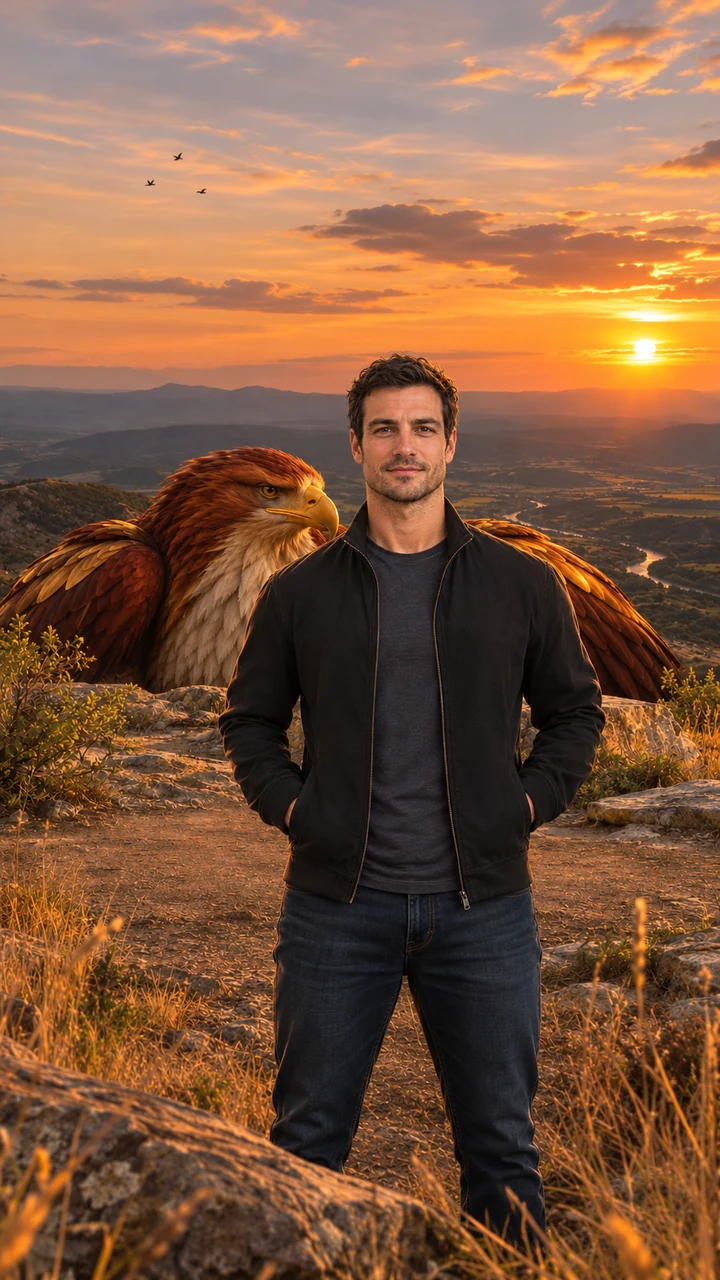
실행 한 번에 두 파일이 나옵니다. 워터마크 없는 480p 또는 720p의 9:16 MP4와, 영상이 시작되는 합성 정지 이미지입니다.
클립에는 음악과 효과음이 이미 들어 있습니다. 바람, 날갯짓, 먼 독수리 울음, 느린 현악과 낮은 드럼. 게시 전에 더할 것은 없습니다.
5단계 — 존중하며 게시하기
- 앱이 요구하면 영상을 AI 생성으로 표시합니다.
- 자신의 사진, 또는 동의한 성인의 사진만 올립니다.
- 종교적 인물이나 신앙을 조롱하는 데 이 장면을 쓰지 마세요.
자타유 AI 영상·이미지 무료 프롬프트
다음은 이 사이트가 대신 실행하는 프롬프트의 축약본입니다. 여기에 붙여 넣을 필요는 없습니다. 참조 사진을 받는 다른 이미지·영상 모델에서 같은 화면을 만들고 싶은 사람을 위한 것입니다. 영어로 읽을 때 가장 정확합니다.
자타유 AI 이미지 프롬프트
Photorealistic vertical 9:16 portrait of one adult person standing on a golden-hour rocky ridge above a wide valley, facing the camera, framed from the knees up, calm and confident, warm sunset backlight, dry grass and low bushes, a colossal original mythic eagle with deep red-brown and burnished gold feathers, a pale cream chest, a hooked golden beak and calm amber eyes crouched just behind the ridge with only its head and folded wings visible; a natural bird with no crown, jewelry, armor or human features. Exactly one person, no other people, no text, no logos, no watermark.
Jatayu Rise 영상 프롬프트
Animate the image as the first frame. One continuous 8-second vertical 9:16 shot with no cuts. Keep the person's face, hair, outfit and the background exactly as in the first frame in every frame; the person stays facing the camera. The eagle keeps the same look, colors and feathers throughout. 0–2s: the person stands still facing the camera, wind moving their hair and clothes, small birds drifting across the sunset. 2–5s: behind the person the giant eagle slowly rises above the ridge until its head is high above the person's head. 5–8s: the eagle opens its vast wings wide, filling the sky behind the person, feathers rippling in the wind, a flock of small birds swirling around it; the camera pushes in slowly while the person stays calm and looks into the lens. Majestic, steady and respectful mood. Natural wing physics, real wind, five fingers on each hand, natural human proportions. No extra people, no crown, jewelry or armor on the eagle, no captions, logos or watermarks. Photorealistic cinematic look, warm golden backlight, no morphing, no drifting of the face or background over time.
Jatayu Flyover 영상 프롬프트
Animate the image as the first frame. One continuous 8-second vertical 9:16 shot with no cuts. Keep the person's face, hair, outfit and the background exactly as in the first frame in every frame; the person stays facing the camera. The eagle keeps the same look, colors and feathers throughout. 0–2s: the person stands still facing the camera while the eagle is a distant shape in the sunset sky. 2–5s: the eagle glides toward the camera, growing huge, wings fully spread. 5–7s: it sweeps low just over the person's head, its shadow passing over them, the wind blowing their hair and clothes. 7–8s: the eagle climbs away into the sky behind the person with a flock of small birds trailing; the person glances up, then looks back into the lens. Majestic, steady and respectful mood. Natural wing physics, real wind, five fingers on each hand, natural human proportions. No extra people, no crown, jewelry or armor on the eagle, no captions, logos or watermarks. Photorealistic cinematic look, warm golden backlight, no morphing, no drifting of the face or background over time.
이미지 모델은 이미지 프롬프트에서 시작합니다. 영상 모델은 사진과 애니메이션 프롬프트 중 하나를 첫 프레임으로 받습니다. 결과는 모델마다 다르고, 여기 쓰인 버전은 이 사이트에 맞게 조정되었습니다.
대신 Google Flow에서 자타유 편집 만들기
Google Flow로도 비슷한 화면을 낼 수 있습니다. 독수리 움직임의 참고 영상, 자기 사진, 클립 속 인물을 바꾸는 프롬프트를 준비합니다. Google 계정이 필요하고 무료 한도는 계정에 따라 다릅니다.
출력은 참고에 충실하기 때문에 고른 클립이 결과의 대부분을 결정합니다. 독수리와 얼굴이 모두 버티려면 몇 번 다시 시도할 각오를 하세요. 마음에 드는 참고가 이미 있다면 합리적인 길입니다.
사진 권장과 비권장
권장
- 무릎 위부터 서 있는 사진, 빛이 고르고 얼굴이 카메라를 향한 것.
- 상반신이 들어오고 머리 위에 독수리 자리가 있는 구도.
- 차분하고 자연스러운 표정. 조용한 장면이지 포즈가 아닙니다.
비권장
- 모자, 후드, 선글라스, 또는 얼굴을 돌린 사진.
- 단체 사진, 반려동물, 어린이. 성인 한 명만 됩니다.
- 강한 필터, 얼굴을 가리는 역광, 흐릿한 파일.
문제 해결
영상에서 얼굴이 다르게 보여요
더 선명하고 정면인, 얼굴이 화면을 더 채우는 사진에서 시작하세요. 얼굴이 작거나 비스듬하면 프레임 사이에서 더 흔들립니다.
독수리가 너무 작아 보여요
Jatayu Rise는 새가 올라갈 공간이 필요합니다. 전신이 보이고 앞쪽 여백이 적은 사진이 더 여유를 줍니다.
생성이 오래 걸려요
실행 한 번에 정지 이미지와 영상, 두 단계를 거치므로 몇 분 걸리는 것은 정상입니다. 페이지를 닫아도 작업은 계속되고 기록에 남습니다.
영상이 흐릿해 보여요
480p는 더 저렴한 선택이고 큰 화면에서는 그게 보입니다. 720p로 다시 실행하면 더 선명한 파일을 얻습니다.
이어서 읽기
자타유 AI 영상 FAQ
서 있는 사진 한 장을 올리고 Jatayu Rise나 Jatayu Flyover를 골라 생성하세요. 몇 분 뒤 8초 9:16 MP4와 원본 정지 사진을 내려받습니다.